

Knowledge Base / Articles

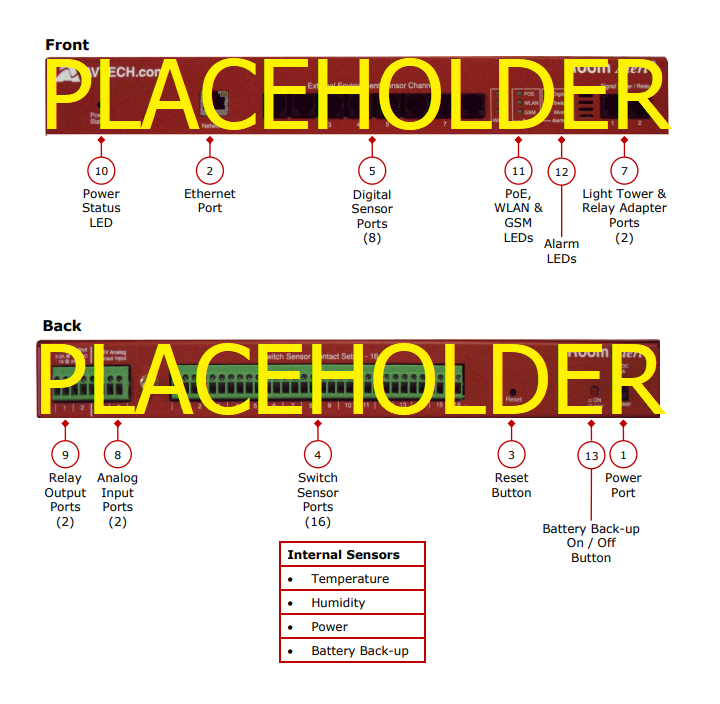
Internal Temperature Sensor – An internal digital sensor monitors ambient temperature with a range of -40° to 185° F (-40° to 85° C).
Internal Humidity Sensor – An internal digital sensor monitors relative humidity with a range of 5% to 95% RH.
Internal Power Sensor – An internal sensor monitors the power state (main power or battery-back up power).
Internal Battery Back-up – An internal battery back-up can power Room Alert 32E for up to 15 minutes.
(1) Power Port – A standard power port connects Room Alert to an electrical outlet with any AVTECH 5V 1A Power Adapter. Models are available for all countries.
(2) Ethernet Port – An RJ-45 port connects Room Alert to your network via an RJ-45 Ethernet cable.
(3) Reset Button – A small push button resets Room Alert.
(4) Switch Sensor Port(s) – Dry contacts connect Room Alert to any AVTECH switch sensor or dry contact on a device (e.g., HVAC, generator, pump, fan, etc.) via standard speaker wire or low-voltage 2-wire cable.
(5) Digital Port(s) – Standard RJ-11 jack(s) connect any AVTECH digital sensor to Room Alert via a standard RJ-11 (straight through) telephone cord.
(6) Light Tower & Relay Adapter Port(s) – A standard RJ-11 jack connects a Light Tower & Relay Adapter to Room Alert 32S via a standard RJ11 (straight through) telephone cord.
(7) Analog Input Port(s) – Set(s) of contacts connect any low-voltage analog sensor to your Room Alert 32S via standard speaker wire.
(8) Relay Output Port(s) – Set(s) of contacts connect any low-voltage device to your Room Alert 32S via standard speaker wire.
(9) Power Status LED – An LED indicates the power status of Room Alert 32S (Green = Main or PoE, Red = Internal UPS power).
(10) Alarm LEDs – LEDs light red or green to indicate alarm or clear status of Digital or Switch sensors (Green = Clear, Red = Alarm).
(11) On / Off Button – A push button turns the Room Alert’s internal battery back-up on and off.
The Room Alert 32S standard package includes:


We'd love to talk with you about your monitoring needs. Contact one of our Product Specialists for a free consultation.





You may find Windows Command Prompt at the following path:
To run Windows Command Prompt as an administrator:

If you are using this client, you should configure the general SNMPv3 Credentials, but leave the Read / Write SNMPv3 Credentials section blank.

| Current S models | Current E models |
|---|---|
| Room Alert 32S | Room Alert 32E |
| Room Alert 12S | Room Alert 12E |
| Room Alert 3S | Room Alert 4E |
| Room Alert 3E | |
| S models | E & W models |
|---|---|
| Room Alert 32S | Room Alert 32E |
| Room Alert 12S | Room Alert 12E |
| Room Alert 3S | Room Alert 4E |
| Room Alert 3E | |
| Room Alert 3W |
| Model |
|---|
| Room Alert MAX |
| Room Alert 32S |
| Room Alert 12S |
| Room Alert 3S |
| Room Alert 32E/W |
| Room Alert 12E |
| Room Alert 4E |
| Room Alert 3E |
| Room Alert 3 Wi-Fi |


