

Knowledge Base / Frequently Asked Questions / Room Alert Monitors (PRO, MAX, and Legacy)
Room Alert MAX exposes sensor data through three SNMP tables:
To interpret a reading, you may need to move across more than one table.
Each OID consists of:
Each table has its own base OID and its own index format.
The Room Alert MAX Base Station MIB is rooted at:
1.3.6.1.4.1.20916.1.14
If your SNMP utility does not easily support uploading the Room Alert MAX MIB file and performing a WALK, you may find it helpful to use a free SNMP tool during setup. Depending on your preference, you can choose a command-line option (such as net-snmp) or graphical tool (like ManageEngine).
The Channel table contains the actual channel readings and channel-level metadata.
1.3.6.1.4.1.20916.1.14.3.1
1.3.6.1.4.1.20916.1.14.3.1.1.2 = channelGroupReference1.3.6.1.4.1.20916.1.14.3.1.1.3 = channelType1.3.6.1.4.1.20916.1.14.3.1.1.4 = channelValue1.3.6.1.4.1.20916.1.14.3.1.1.5 = channelDescription1.3.6.1.4.1.20916.1.14.3.1.1.5.44.53.48.58.54.50.58.53.53.58... └────────── Base OID ────────┘└───────────── Index ────────────┘
Example using net-snmp
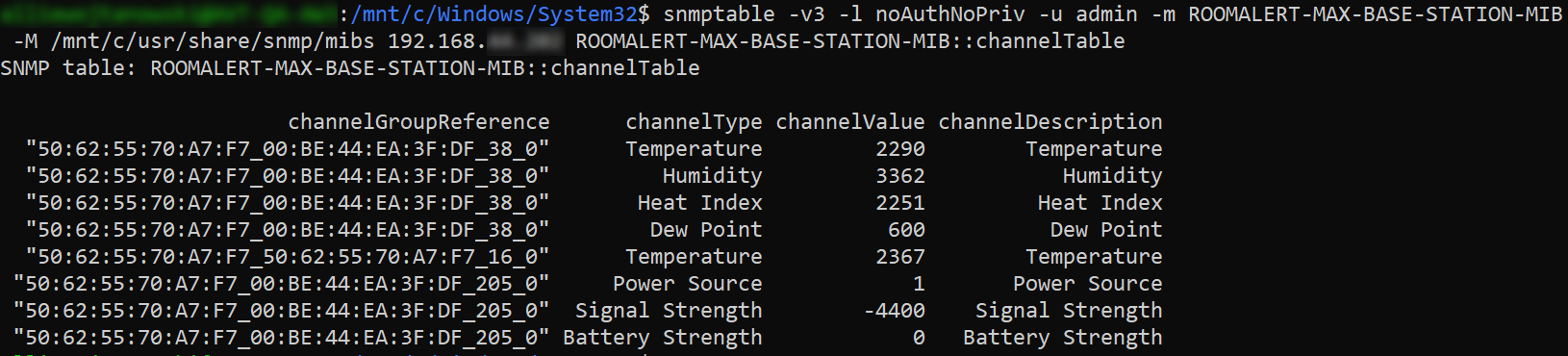
Example using ManageEngine

The Sensors table stores the sensor name and description.
1.3.6.1.4.1.20916.1.14.1.1
1.3.6.1.4.1.20916.1.14.1.1.1.2 = sensorsName1.3.6.1.4.1.20916.1.14.1.1.1.3 = sensorsDescriptionThe sensorsName table is indexed by the sensor’s MAC address.
Running this command…
snmpwalk -v 3 -l noAuthNoPriv -u admin [IP address] 1.3.6.1.4.1.20916.1.14.1.1.1.2
… returns values such as:
sensorsName.0.190.68.234.63.223 = TH-3FDF
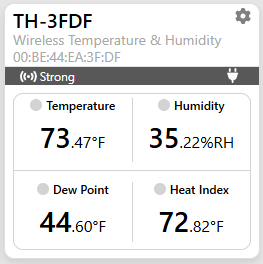
0.190.68.234.63.223 = 00:BE:44:EA:3F:DF

Decimal → Hex
      0 → 00
    190 → BE
     68 → 44
    234 → EA
     63 → 3F
    223 → DF
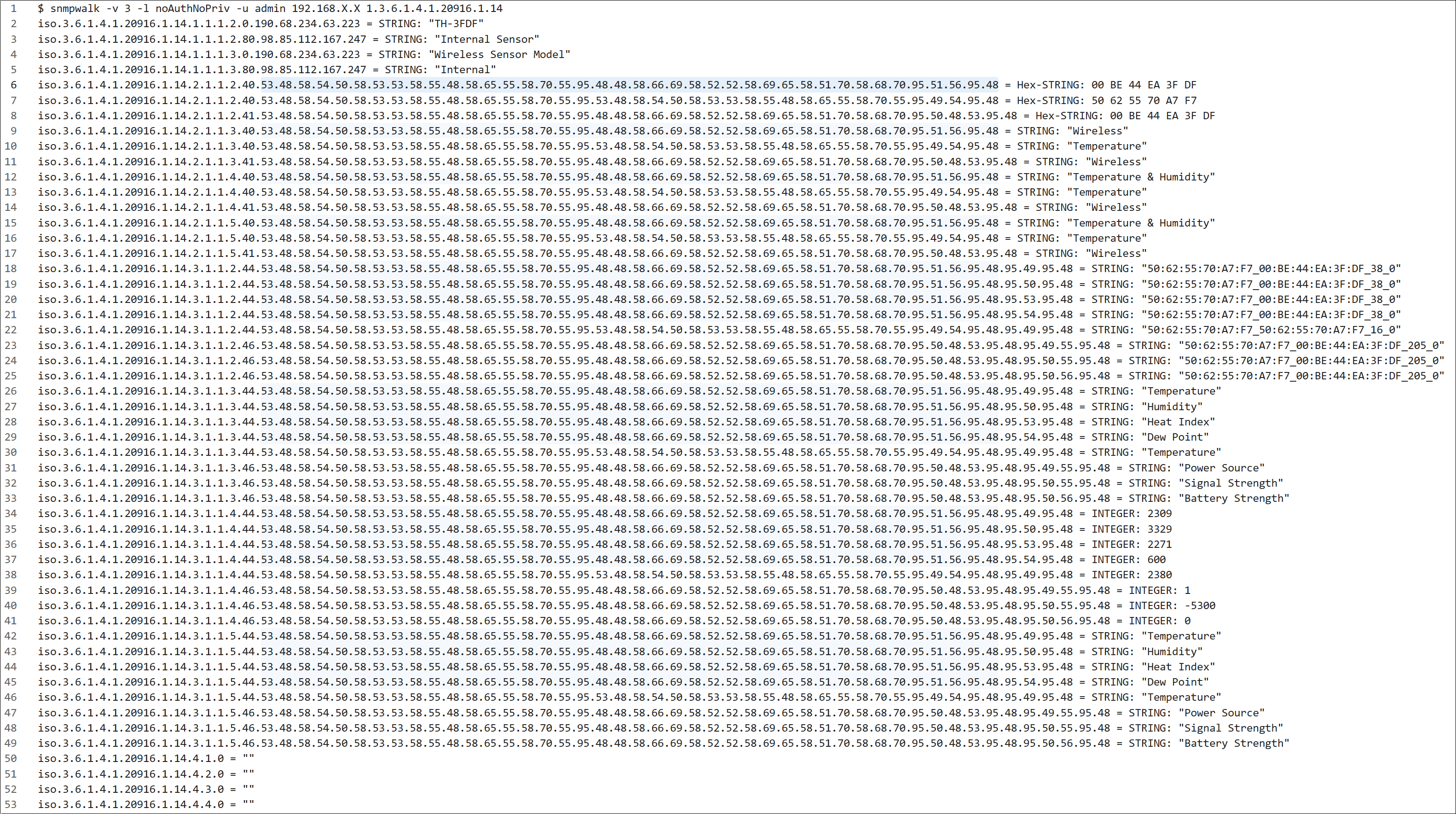
If you need to work with individual OIDs, one method is to walk the entire device and then pull the results into a code editor capable of highlighting matches (or “highlighting all occurrences”) such as VS Code. This way, you can highlight a sensor index, or part of a sensor index, and see all matches.


We'd love to talk with you about your monitoring needs. Contact one of our Product Specialists for a free consultation.





You may find Windows Command Prompt at the following path:
To run Windows Command Prompt as an administrator:

If you are using this client, you should configure the general SNMPv3 Credentials, but leave the Read / Write SNMPv3 Credentials section blank.

| Current S models | Current E models |
|---|---|
| Room Alert 32S | Room Alert 32E |
| Room Alert 12S | Room Alert 12E |
| Room Alert 3S | Room Alert 4E |
| Room Alert 3E | |
| S models | E & W models |
|---|---|
| Room Alert 32S | Room Alert 32E |
| Room Alert 12S | Room Alert 12E |
| Room Alert 3S | Room Alert 4E |
| Room Alert 3E | |
| Room Alert 3W |
| Model |
|---|
| Room Alert MAX |
| Room Alert 32S |
| Room Alert 12S |
| Room Alert 3S |
| Room Alert 32E/W |
| Room Alert 12E |
| Room Alert 4E |
| Room Alert 3E |
| Room Alert 3 Wi-Fi |


