Knowledge Base / News

October is Cybersecurity Awareness Month, a reminder that protecting an organization means more than antivirus software and strong passwords. In 2026, cyber-physical security matters as much as network security. Temperature, power, water and physical access can take critical systems offline just as surely as an attacker can.
Verizon’s 2026 Data Breach Investigations Report found that vulnerability exploitation accounted for 31% of breaches, up from 20% the year before. That makes it the leading initial access vector for the first time. Third-party involvement reached 48% of breaches, up from 30%. Meanwhile, 87% of respondents to the World Economic Forum’s Global Cybersecurity Outlook 2026 named AI-related vulnerabilities as the fastest-growing cyber risk.
These findings reach beyond servers and laptops. Network-connected sensors, access panels and building controllers run firmware, use credentials and often come from third parties. They need the same patching and vendor scrutiny as the rest of the network.
IT, facilities and security teams once worked largely separately. Network-connected building automation, access control and environmental sensors have blurred those boundaries.
Since Revision 3 in 2023, NIST SP 800-82 has classified building automation, physical access control, and physical environment monitoring systems as operational technology. Its September 2026 draft of Revision 4 adds dedicated guidance for building automation. As physical systems become connected, the physical environment becomes part of the security program.
Not every threat to availability starts with a cyberattack:
• Temperature: An HVAC failure can overheat servers and networking equipment.
• Power: An outage can take computing, networking and security systems offline.
• Backup power: A failed UPS or battery leaves no protection during an outage.
• Water: A leak can damage equipment and disrupt operations.
• Physical access: Unauthorized access to equipment creates risks digital controls can’t address.
Each can take critical systems down without an attacker involved.
1.) Digital: vulnerabilities, credentials, network activity, firmware and third-party access.
2.) Physical: equipment rooms, doors, cameras and security system availability.
3.) Environmental: temperature, humidity, water, power, UPS status and HVAC operation.
Environmental monitoring is the early warning layer. A rising temperature alert can prompt action before equipment overheats. A power loss notification can trigger a response. A water alert can give staff time to protect equipment.
Since these monitoring systems are network-connected, they belong inside the security program too.
Room Alert helps protect critical infrastructure by monitoring the environmental conditions that can disrupt operations. From rising temperatures and power interruptions to UPS status changes, water near equipment and unauthorized access to equipment rooms, Room Alert alerts your team when conditions exceed your preset thresholds. These early warnings give your team time to respond before an environmental issue leads to equipment damage or operational disruption.
Since environmental monitoring is part of a broader security strategy, the monitoring system itself must be secure too. The Room Alert 32S, our flagship environment monitor, offers the highest level of security in our product line, with protocols like HTTPS, TLS and SNMP v3 to help secure monitoring communications.
Strengthen your cyber-physical security strategy with the Room Alert 32S.


We'd love to talk with you about your monitoring needs. Contact one of our Product Specialists for a free consultation.


You may find Windows Command Prompt at the following path:
To run Windows Command Prompt as an administrator:
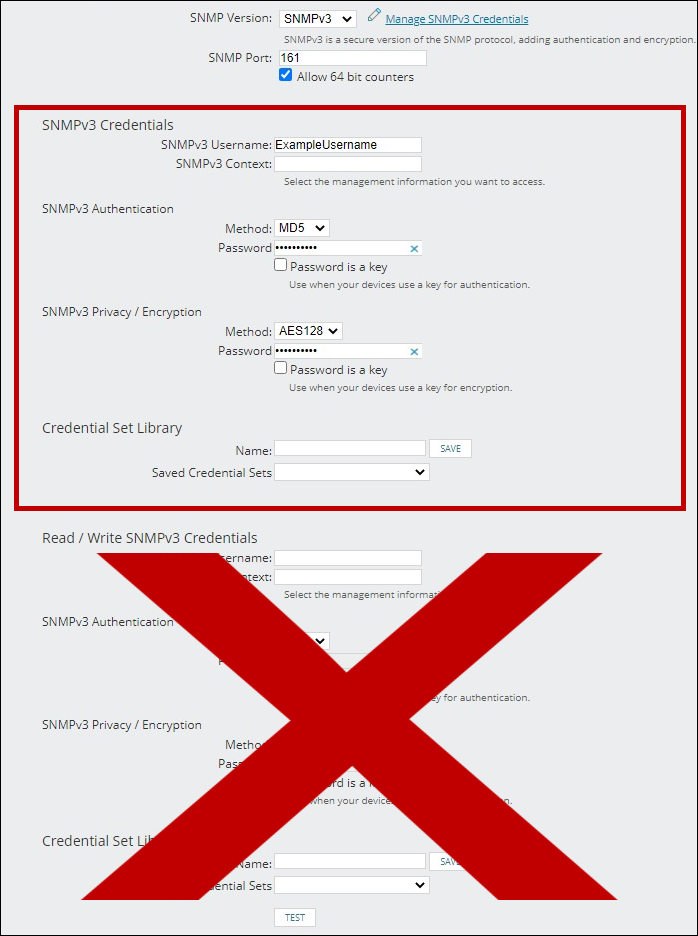
If you are using this client, you should configure the general SNMPv3 Credentials, but leave the Read / Write SNMPv3 Credentials section blank.

| Current S models | Current E models |
|---|---|
| Room Alert 32S | Room Alert 32E |
| Room Alert 12S | Room Alert 12E |
| Room Alert 3S | Room Alert 4E |
| Room Alert 3E | |
| S models | E & W models |
|---|---|
| Room Alert 32S | Room Alert 32E |
| Room Alert 12S | Room Alert 12E |
| Room Alert 3S | Room Alert 4E |
| Room Alert 3E | |
| Room Alert 3W |
| Model |
|---|
| Room Alert MAX |
| Room Alert 32S |
| Room Alert 12S |
| Room Alert 3S |
| Room Alert 32E/W |
| Room Alert 12E |
| Room Alert 4E |
| Room Alert 3E |
| Room Alert 3 Wi-Fi |