Knowledge Base / News / IT & Data Centers
For two decades, server racks were predictable. Most enterprise racks were designed around 5 to 15 kW, and with that heat spread evenly across a row, one or two cold-aisle sensors told you most of what you needed to know.

GPU racks now commonly draw 20 kW to more than 100 kW. Most facilities aren’t rebuilding to host them. They’re adding one or two rooms designed, cooled and monitored for far less, and the monitoring rarely keeps up.
When every rack draws a similar load, heat spreads evenly and one sensor mid-aisle can stand in for every rack around it. Add an 80 kW GPU rack, and that one cabinet can put out more heat than several of its neighbors combined. The aisle no longer has an average temperature worth trusting. It has a hot spot, a steep drop-off around it and plenty of air that looks fine.
Total heat went up, but uneven heat is what breaks a monitoring plan built for an even room.
A sensor only measures the air touching it, and a few feet away the reading can be very different.
Picture your cold-aisle sensor reading a comfortable 72°F (22°C) while, three racks away, the top of a GPU cabinet pulls in recirculated exhaust at 85°F, above the ASHRAE recommended inlet limit of 80.6°F (27°C). Nothing alerts until something fails.
ASHRAE TC 9.9 guidance says to measure air at the server intake, at more than one height. For high-density racks, treat that as the minimum:
• Inlet at three heights. Top, middle and bottom of the rack front. Recirculated hot air usually sneaks in at the top.
• Exhaust at the rear. Especially the top rear, often the hottest point. The front-to-rear difference shows how hard cooling is working.
• Neighboring racks. A hot rack heats the cabinets beside it, so monitor their inlets too.
• Airflow. Sensors at vents and racks catch a blocked tile or failed fan before temperatures climb.
• Humidity and dew point. New cooling can push humidity toward static risk (too dry) or condensation (too humid).
• Leaks, if you add liquid cooling. Rear-door heat exchangers and direct-to-chip cooling bring coolant lines into the room. Put leak detection under and around them.
Rows of standard 8 kW racks can get by with fewer points. Put sensors where the heat is.
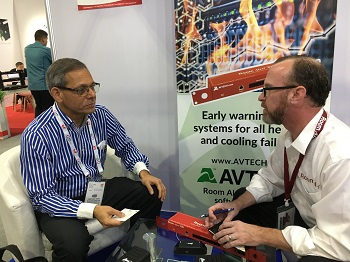
Room Alert has protected facilities since 1988 and is built for this kind of targeted expansion.
• Add points where you need them. The Room Alert 32S has 8 digital sensor ports, 16 switch sensor channels and capacity for 32+ sensors, enough to surround a new GPU rack without replacing your system.
• Go wireless where cable is hard to run. Room Alert MAX sensors transmit up to 100 feet to a Base Station, so you can cover a new cabinet without pulling cable.
• Watch airflow and power, not just temperature. The Digital Temperature & Air Flow Sensor mounts on vents, ducts and fans, and the Digital Active Power Sensor clips onto power cables without tools. Together they show cause as well as effect.
• Alert on the gradient, not just the number. Room Alert Account puts alerts and reports in one dashboard. Its patented Monitor360 technology builds alerts across several sensors, so a hot rack stands out from its neighbors, with push notifications through the free mobile app.
The result: when a hot spot forms, a sensor is close enough to catch it, and your team hears about it right away, so you can take corrective action and stop disaster in its tracks.
Not sure about any of these? We’d love to connect you with one of our Room Alert Product Specialists to map sensors to your highest-density racks.


We'd love to talk with you about your monitoring needs. Contact one of our Product Specialists for a free consultation.


You may find Windows Command Prompt at the following path:
To run Windows Command Prompt as an administrator:
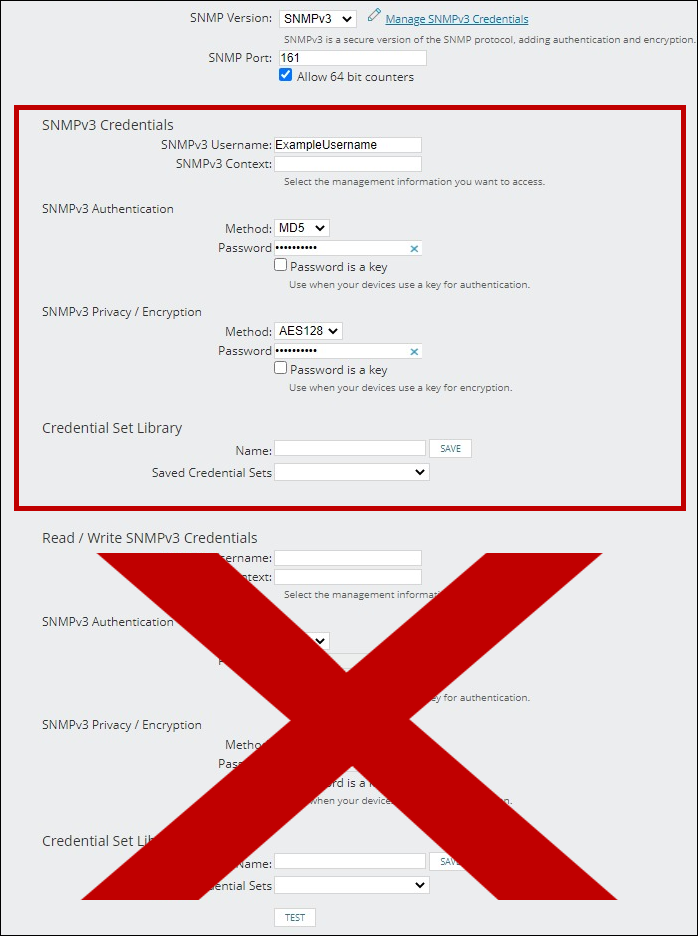
If you are using this client, you should configure the general SNMPv3 Credentials, but leave the Read / Write SNMPv3 Credentials section blank.

| Current S models | Current E models |
|---|---|
| Room Alert 32S | Room Alert 32E |
| Room Alert 12S | Room Alert 12E |
| Room Alert 3S | Room Alert 4E |
| Room Alert 3E | |
| S models | E & W models |
|---|---|
| Room Alert 32S | Room Alert 32E |
| Room Alert 12S | Room Alert 12E |
| Room Alert 3S | Room Alert 4E |
| Room Alert 3E | |
| Room Alert 3W |
| Model |
|---|
| Room Alert MAX |
| Room Alert 32S |
| Room Alert 12S |
| Room Alert 3S |
| Room Alert 32E/W |
| Room Alert 12E |
| Room Alert 4E |
| Room Alert 3E |
| Room Alert 3 Wi-Fi |