Knowledge Base / News / Facilities / Warehouses
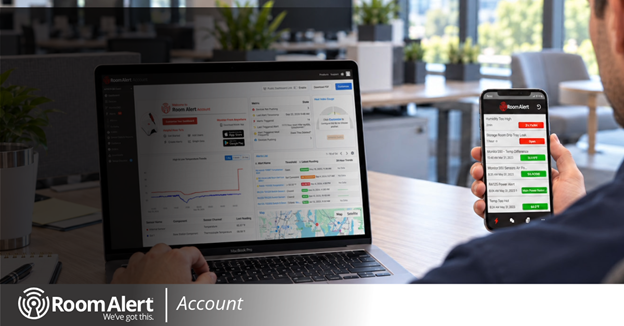
When environmental conditions change, having the right information at a glance can make all the difference. The new customizable Room Alert Account dashboard puts your most important monitoring data in one place, so your team can track conditions, spot trends and stay informed about potential issues.
With drag-and-drop widgets, temperature trend graphs, monitor maps and more, you can organize your dashboard around what matters most to your facility, making it easier to monitor your environment and respond when conditions change.
Choose the widgets that give your team the clearest picture of your environment. Available widgets include:
More widgets and features are on the way.
Environmental issues are easier to address when they’re caught early. Room Alert notifies your team as soon as conditions cross your thresholds, and a dashboard organized around your priorities shows the trends leading up to them. That gives your team time to act before an issue affects equipment, operations or people.
The dashboard also works alongside the rest of Room Alert Account. Create customized alerts, set up scheduled reports, and use Monitor360 technology to build virtual sensors and alerts that show you why conditions are changing, not just what is happening. With the free Room Alert mobile app, your team also gets push notifications and in-app chat wherever they are.
Room Alert Account access is free for every organization and never expires. Upgraded tiers are also available for organizations that need expanded alerts and reports, or longer historical data retention. Monitoring works best when it’s in place before you need it.
Log in to Room Alert Account today and click “Customize Your Dashboard” to build yours.
Have an idea for a feature you’d like to see next? Email us at Support@RoomAlert.com and we’ll share it with our Engineering team.


We'd love to talk with you about your monitoring needs. Contact one of our Product Specialists for a free consultation.


You may find Windows Command Prompt at the following path:
To run Windows Command Prompt as an administrator:
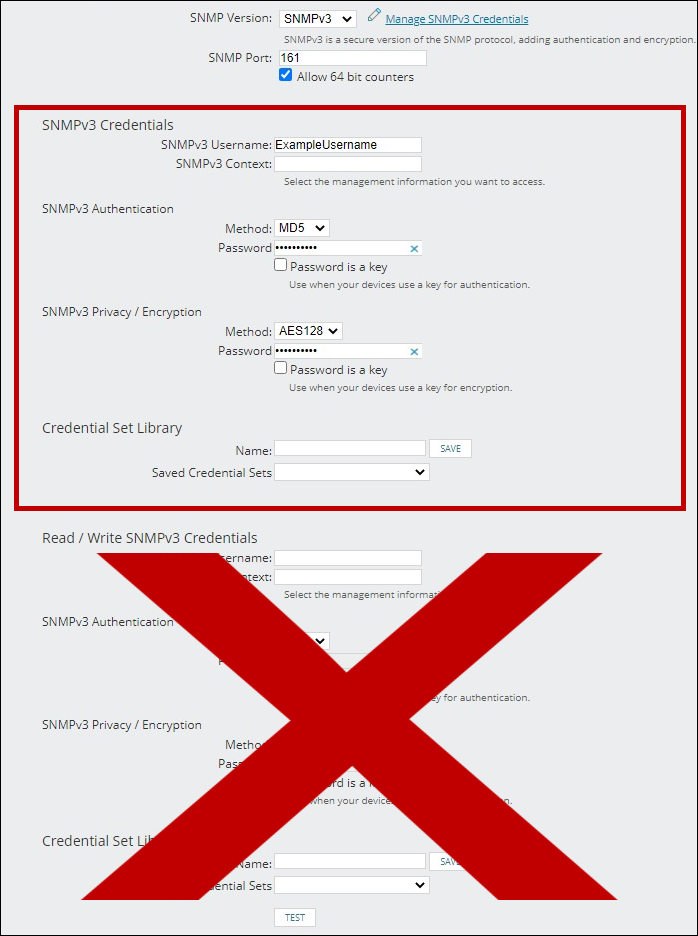
If you are using this client, you should configure the general SNMPv3 Credentials, but leave the Read / Write SNMPv3 Credentials section blank.

| Current S models | Current E models |
|---|---|
| Room Alert 32S | Room Alert 32E |
| Room Alert 12S | Room Alert 12E |
| Room Alert 3S | Room Alert 4E |
| Room Alert 3E | |
| S models | E & W models |
|---|---|
| Room Alert 32S | Room Alert 32E |
| Room Alert 12S | Room Alert 12E |
| Room Alert 3S | Room Alert 4E |
| Room Alert 3E | |
| Room Alert 3W |
| Model |
|---|
| Room Alert MAX |
| Room Alert 32S |
| Room Alert 12S |
| Room Alert 3S |
| Room Alert 32E/W |
| Room Alert 12E |
| Room Alert 4E |
| Room Alert 3E |
| Room Alert 3 Wi-Fi |